Creating a content strategy isn’t easy. It takes research, insights, and time to develop something that delivers results.
While learning how to create a content strategy is one thing, putting it into action and producing ROI is another story.
A majority of B2C marketers say they have some kind of strategy. However, almost a third do not. A content creation strategy is critical if we want to deliver results. Otherwise, what’s the point?
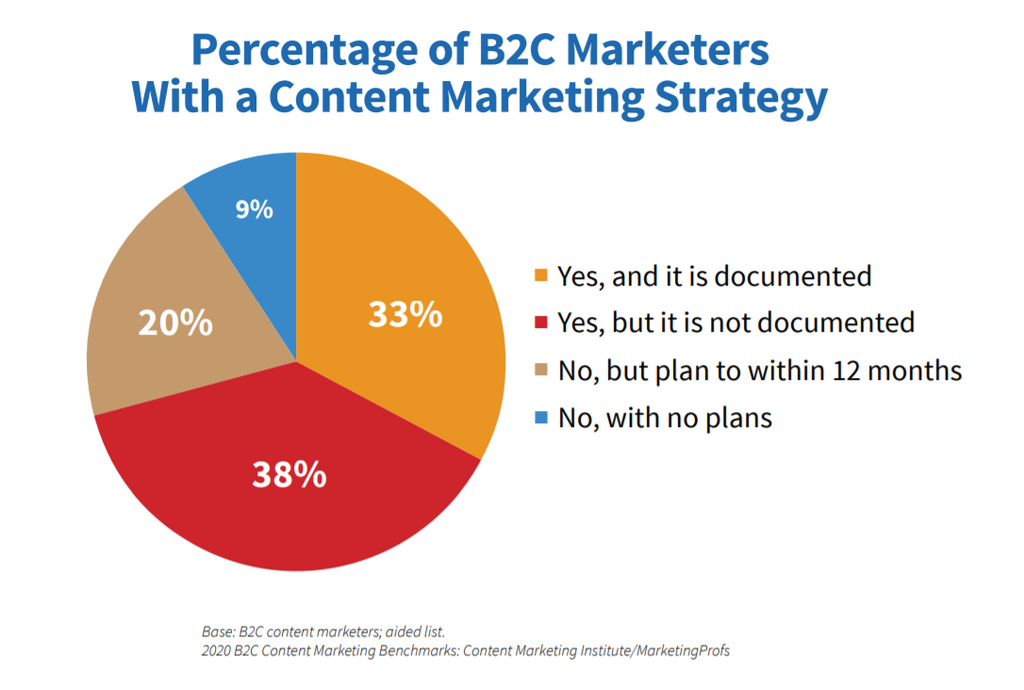
Source: Content Marketing Institute
Developing a strategy takes sacrifice but its 100% worth the effort.
What Is a Content Strategy?
Content marketing refers to the concept of creating content – like blogs, eBooks, infographics, and podcasts – to reach audiences and sell products or services.
A content strategy dictates how we’ll use content to reach our goals. A strategy involves:
- Learning about our audience
- Setting clear yet attainable goals
- Researching keywords and headlines
- Creating topic calendars
- Deciding which social channels to use
- Looking for influencers and guest blog sites
- Analyzing our competition and their content strategies
How to Create a Content Strategy Your Audience Will Love
If there’s one tip we can offer anyone preparing to create content, it’s this: slow down.
Learning how to create a content strategy that produces ROI takes time and research.
Here’s what we’ll be covering:
- Learn About Your Digital Content Strategy’s Target Audience
- Decide How to Determine Success of Your Content Creation Strategy
- Choose the Right Distribution Channels
- Research the Right Keywords and Headlines for a Calendar
- Look for the Perfect Topics for Your Digital Content Strategy
- Check Out Your Competition
Learn About Your Digital Content Strategy’s Target Audience
If we want our content to earn clicks, shares, and conversions, we need to figure out who our audience is and what kind of content they like.
We have several options for learning about our audience. We can run polls and surveys, follow our target markets on social media, and check out our competitors.
BuzzSumo can help us run some content analysis in our industry to see what they’re sharing and scope out key influencers. Even if we don’t want to promote our content through influencers, we can still follow what they post.
Let’s say we’re learning how to create a content strategy for a yoga clothing line. We can find plenty of Facebook pages and Twitter influencers to follow for inspiration:
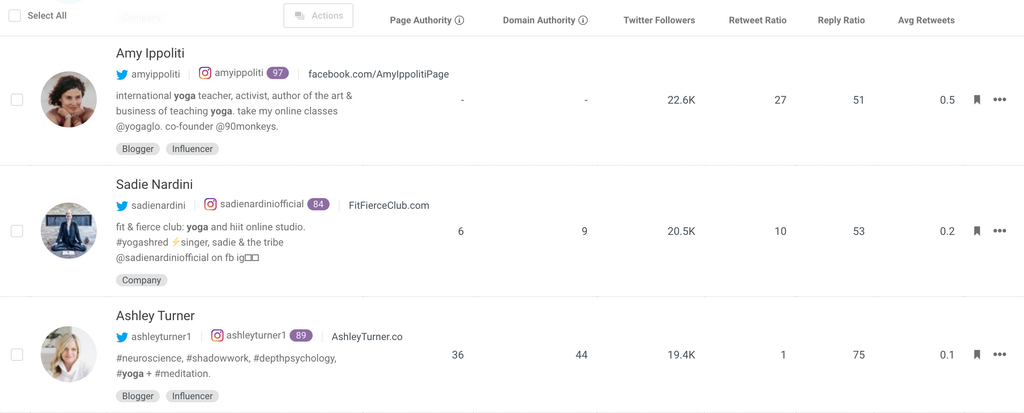
Source: BuzzSumo
Decide How to Determine Success of Your Content Creation Strategy
We need to figure out how we’ll measure whether our content marketing is successful or not. What are our goals? Do we want to drive conversions, build consistent website traffic, or increase brand awareness?
We then need to choose our key performance indicators (KPIs) so we can track our results. Depending on our goals, these include
- Email signups
- Lower website bounce rate
- Conversions
- Social media follows
- Monthly active website traffic
Choose the Right Distribution Channels
If we want our content to earn clicks and engagement, we must figure out where our audience hangs out online. Each platform attracts different audiences for distinct topics.
BuzzSumo can help us figure out where our industry’s content performs best. Let’s plug the topic “yoga” into the Content Analyzer.
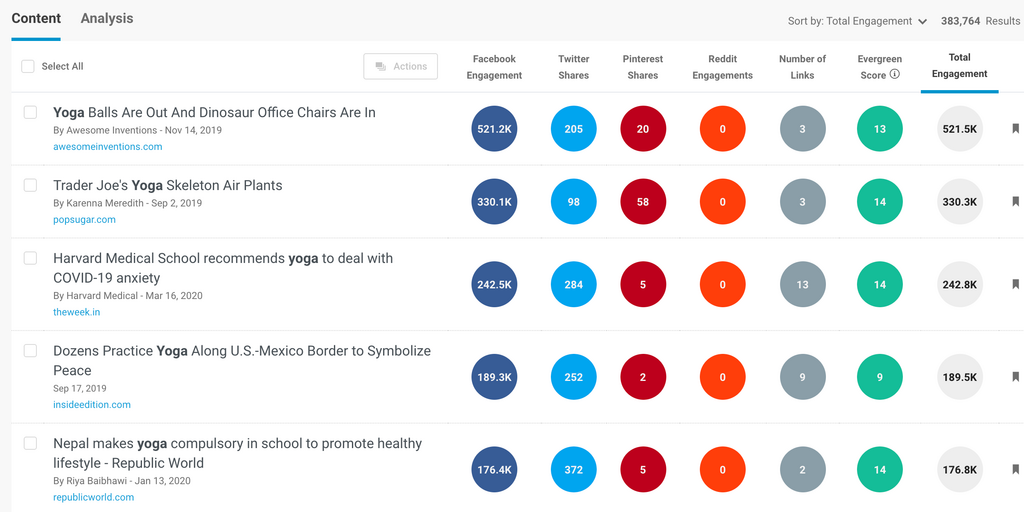
Source: BuzzSumo
It looks like Facebook is our best bet.
Guest blogging is also effective – with the right channels. We could use the BuzzSumo Author Search to track down some prominent sites for possible publishing.
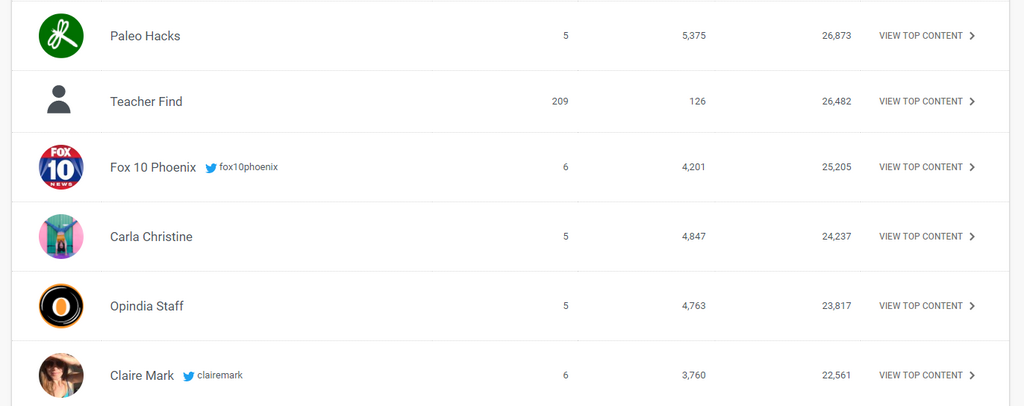
Source: BuzzSumo
With these results, Paleo Hacks might be a smart choice.
Research the Right Keywords and Headlines for a Calendar
Search engine optimization is important for attracting organic traffic not only from Google but across social media as well. Facebook and other social media platforms scan headlines and meta data when users run searches for different topics.
We can use tools like SEMrush, Ahrefs, KWfinder and our own keyword analyzer to build our keyword report which we’ll use for topic planning.
Next, we need to find some great titles. For ideas, check out our analysis of the best headline phrases to start and end your headlines. American Marketing Institute also offers an awesome free headline analyzer to make sure our titles trigger an emotional response.
Finally, we must put our digital content strategy together in a calendar so we can stay on track with our publishing.
Look for the Perfect Topics for Your Digital Content Strategy
We need to create interesting content if we want our audience to engage and share it.
We could spend time watching our audience on social media and taking notes. However, we could also use BuzzSumo to find awesome topics.
Let’s go back to the Content Analyzer search we ran.
Source: BuzzSumo
A blog or video on yoga poses for anxiety might be a clever idea.
See the green column on the right? That’s the Evergreen Score. It tells us how well the topic stands the test of time. Ideally, we want a high evergreen score because that indicates the topic won’t fizzle out after a few days.
We could also run our yoga topic through the YouTube Analyzer to see which videos have earned the most engagement over the past year.
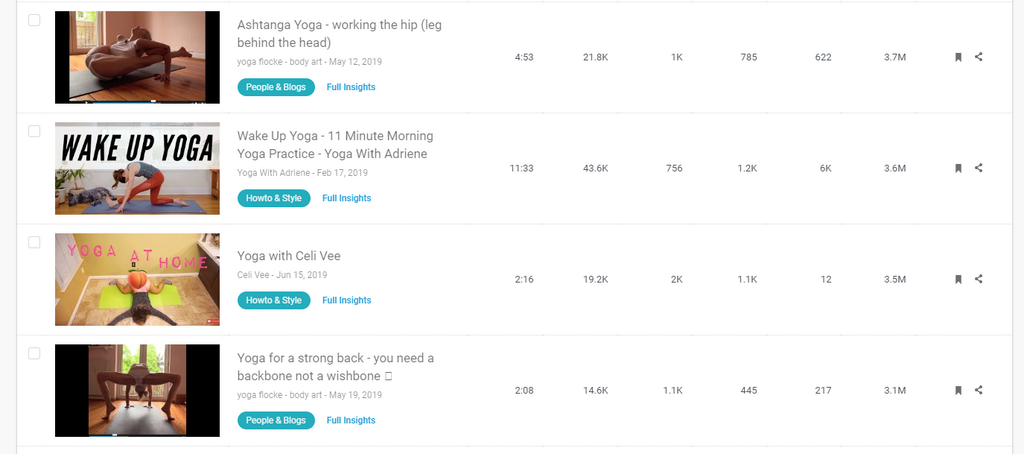
Source: BuzzSumo
When we click on the Full Insights button, we can see how the video performed on a deeper level.
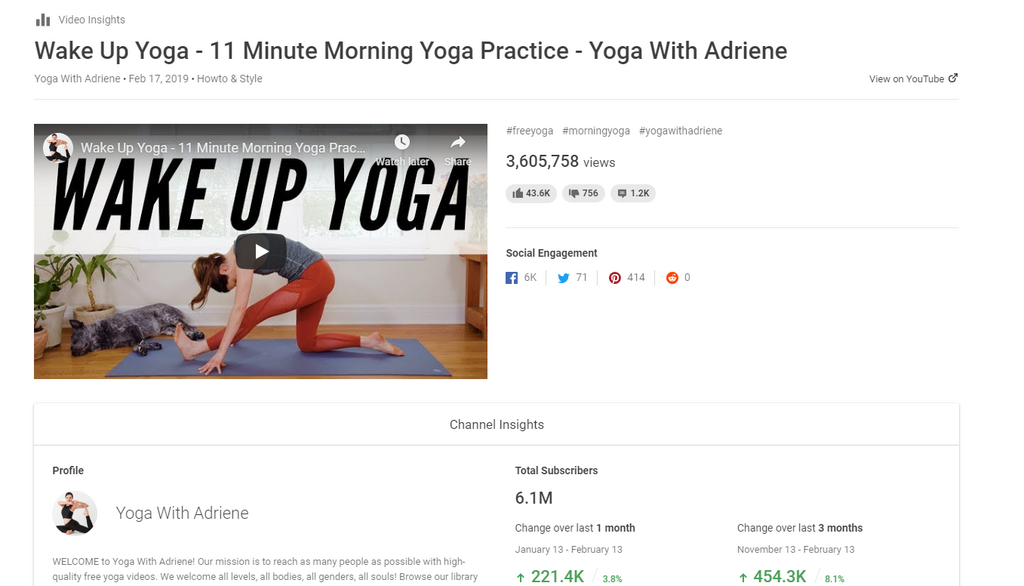
Source: BuzzSumo
Check Out Your Competition
Now, we don’t ever want to copy or steal content from our competitors. However, we can keep an eye on our competition to see what kind of content they share and what performs well.
We could start by simply following our competitors on social media, watching them for some time, and taking note of their results.
We might also use the BuzzSumo Facebook Analyzer to filter their posts by engagement over certain periods of time.
Here’s a snapshot of Lululemon’s most engaging content. It looks like quite a bit of product promotions so some high-quality images of our clothing would be in order.

Source: BuzzSumo
Gaiam, on the other hand, seems to earn most of their engagement from informative and inspirational content. There are some great ideas here we could use for inspiration.
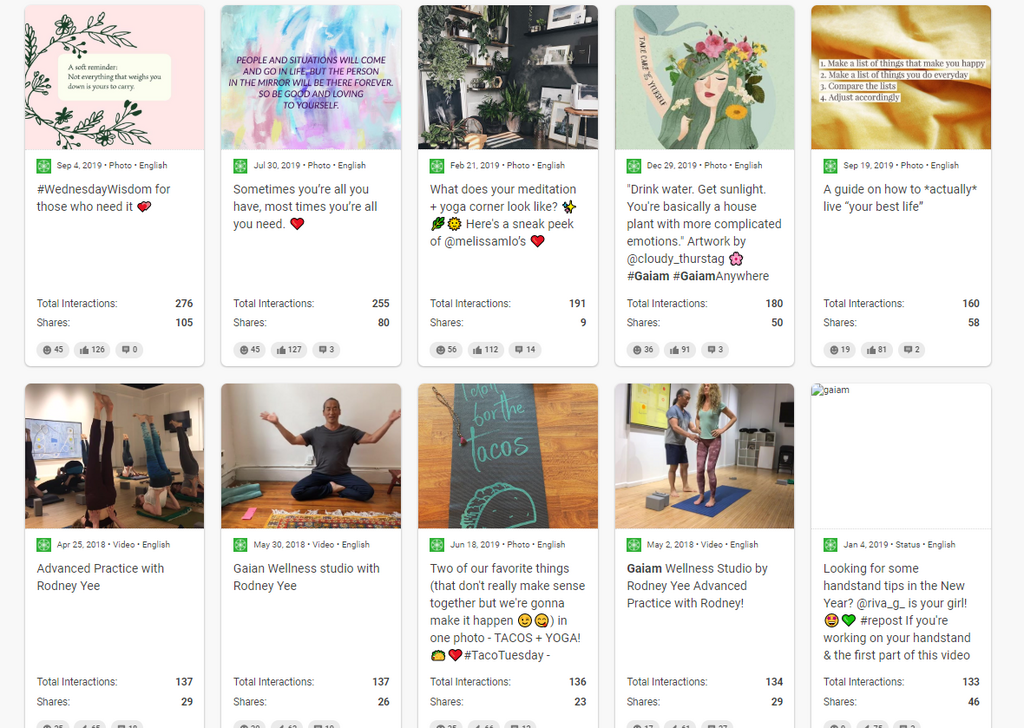
Source: BuzzSumo
Start Researching Ideas Now
A killer content creation strategy starts with the right topic ideas. BuzzSumo can help you find the perfect inspiration for every industry at every stage of the sales cycle.
Plus, you can keep an eye on competitors and set up brand and PR monitoring alerts to track your own online presence.
Start your 30-day free trial of BuzzSumo to launch your digital content strategy now – no credit card required!
Categories
Content MarketingCategories
Content MarketingThe Monthly Buzz⚡
Subscribe to BuzzSumo's monthly newsletter to:
Stay up-to-date with the best of the best in content marketing 📝
Get data-informed content, tips and tidbits insights first 👩🏻💻
Read top shared content by top marketing geeks 🤓
Try
Enter any topic, term or url to search to see BuzzSumo in action. It’s free!
100% free. No credit card required.